
















Know what AI actually solves.
AI in app development is everywhere by now, but it is not the same everywhere. We use AI in our own development process and in the apps we build for clients, and deliberately pick a different approach per situation.


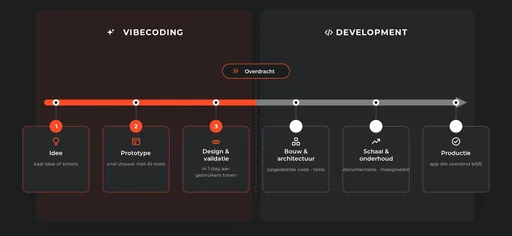
AI is overrated in the short term and underrated in the long term. It is very good at the groundwork: visualising prototypes, writing first versions of code, testing a concept with real users inside a day. But the architectural choices that decide whether an app still stands up in three years remain human work. So we use AI where it wins time, and keep it away from where it adds risk.
What we build with AI
Not every AI application is a chatbot. This is what actually ends up in our clients' apps — and usually it is a combination of a few of these.

Chat & assistants
Customers and staff who get an answer straight away, in the language of your own documentation and manuals. Not a generic internet answer, but what applies at your company.

Pattern recognition
Flagging what deviates in production, sensor or sales data before anyone notices it themselves. Often the quietest AI feature in an app, and usually the most useful.

Document processing
Invoices, forms and reports read automatically and written into the system you already use. That saves retyping, and the typos that come with it.

Search your own data
Answers from your own manuals, contracts and history instead of the open internet. The right standard in ten seconds instead of ten minutes.

Speech to text
Hands-free logging on the shop floor, without taking your gloves off. Spoken entries that land in the system as clean records.

On-device intelligence
Models that run on the device itself, even offline. No cloud costs and no data leaving the app — but more limited in what the model can handle.
AI in our own process


Where does AI speed up our work?
In the groundwork. Sketching a screen flow before a designer touches it, putting a concept in front of a few users within a day, setting up a first version of an integration. That saves time mainly in the concept and design phase — exactly the phase where course corrections are still cheap. Later in the project it takes over repetitive work, such as first versions of code and setting up tests, so developers spend their time on what genuinely requires thought.
And what do we deliberately keep human?
How an app scales from fifteen to a hundred and fifty users, which integrations with existing systems are needed, where the technical risks sit. AI speeds up the process but does not replace the craft. That is the difference between an app that still stands in three years and one that has to be rebuilt at the first growth spurt.
Do you notice that as a client?
Mostly at the start: you see something tangible sooner. A concept you can click through instead of a document, a screen flow you can react to before design work goes into it. That means we talk about the product itself sooner, and about assumptions less.
So why not do everything with AI?
Because the most expensive mistakes are not in the typing but in the choices. An architecture that doesn't scale, an integration that gives way under load, a hole in the security: you often only see those once it is too late to fix them cheaply. We put people on those, people who are accountable for the result.
Read our view
AI in the apps we build

What does that look like in practice?
Sometimes a chat feature that helps customers or staff directly. More often something running in the background: an app that recognises patterns in production data, or that surfaces information the moment someone on the floor needs it. Whatever it is, it sits inside the app people already use, not in a separate tool beside it that they have to learn first.
Where is the gain?
At the companies we work for — in manufacturing, trade and installation — the value is rarely in an eye-catching chatbot. It is in taking away hassle: less paperwork, less manual retyping, less time spent on work a system does just as well. That rarely produces one big breakthrough, but it does give a little time back every day to everyone who uses the app.
What does such a background feature actually do?
An invoice or form read automatically and landing in the system you already use. An alert as soon as a reading deviates from normal. An engineer asking a question in the app and getting the answer from your own manuals, not from the open internet.
How do we get started?
Not with the model, but with the work. We look at where the manual steps sit in an ordinary working day — what gets retyped, looked up or double-checked — and whether an AI feature genuinely removes any of it. If the answer is no, we don't build it. If it does pay off, what you are allowed to do with your data decides the approach: on the device, on your own infrastructure, or through an external model.
Book an intro call
How that in practice looks
In FiDB an assistant runs on the device itself: questions about races, drivers and standings are answered without that data ever leaving the handset. Of the three routes above, it is the most outright form of on-device.
 FiDB
Proof of concept with on-device AI
View case study
FiDB
Proof of concept with on-device AI
View case study
What an AI prototype usually lacks
01
Code that is not broken up
One big block works fine, right up until someone else has to change something in it.
02
No tests
Nothing to tell you whether a change breaks something elsewhere. Every change becomes a gamble.
03
No documentation
Why a choice was made is written down nowhere. Six months later nobody remembers, not even the person who built it.
04
Keys in the code
Passwords and API keys sitting in plain sight in the source instead of being stored safely.
If you come to us with a prototype you built yourself, that is a fine starting point — you have something tangible to talk about instead of just an idea. We keep what is usable and straighten out the rest before building on it.
The AI landscape shifts every quarter. That is why we never tie an app to one model or one supplier. The AI layer sits behind its own interface, so a better or cheaper model can take its place without the rest of the app having to change. What runs through an API today can run on-device next year — without your users noticing a thing.
Which AI approach fits your app?
The first question is always whether the AI needs the internet. Then come privacy, customisation and whether the model fits on the device. For most professional apps it ends up being a combination.
Read the decision tree
On-device AI
The model runs on the device itself. The fastest route when the feature is compact enough to travel with it.
- No internet needed
- No cloud costs
- Data stays on the device
- More limited in what the model can handle
Our preference
Self-hosted model or LLM with RAG
An open-source model on your own infrastructure, with RAG on top of your own documents and data if you want it.
- Privacy or customisation critical
- Full control over the model
- No vendor lock-in
- Requires MLOps knowledge
API to an existing model
GPT, Claude, Gemini or Mistral through an API. Often the quickest path to quality, as long as privacy and customisation are not decisive.
- Internet needed
- Fastest route to a result
- Dependent on an external party
- Data leaves the app · cost per use
Got a question?
Partly. AI speeds up the groundwork: prototypes, first versions of code and testing a concept before development time goes into it. The architectural choices that decide whether your app still stands in three years remain human work, and that phase does not speed up.
That is exactly the question that decides which approach we take. If the model fits on the device, nothing leaves the app. If privacy is decisive but the model has to be bigger, we host an open-source model on our own infrastructure. Only when privacy and customisation are not decisive is an API to an external model the fastest route.
Usually yes, and more often than you would think without rebuilding the app. We first look at where the manual steps sit in the daily work and whether an AI feature can be put against them. Sometimes that is a chat feature; far more often it is something running in the background.
Yes, and it is a fine starting point: you have something tangible to talk about instead of just an idea. We do look at the layer underneath first. We keep what is usable and straighten out the rest before building on it.
That depends mostly on which of the three approaches above fits. On-device is a one-off build with no cloud costs, a self-hosted model is more expensive to run, and an API to an existing model charges per use. In a first conversation we put the options next to your use case.
No. AI takes the repetitive work off our hands: first versions, refactors, setting up tests. Every line passes a developer before it goes to production, and where architecture, security or business trade-offs are involved, people decide.
Speed at the front must not mean paying for it at the back. What AI produces goes through the same review as our own work: is it broken into manageable pieces, is there nothing sensitive in the code, and could someone other than the author still maintain it a year from now.